Key Takeaways
- Queue management software arranges the way customers wait, minimizes their frustration, and raises the level of service at the same time providing businesses with actual data for continuous improvements.
- The best system for you depends on what your main problem is high walk-in volume, appointment scheduling, multi-location visibility, or staff productivity.
- Poor queue management costs more than most businesses realise — in lost customers, stressed staff, and missed operational insight that better systems would reveal.
What Is Queue Management?

Queue management is the process of organising and controlling how people wait for a service.
It’s not just about making lines shorter. It’s about improving the experience of waiting, getting rid of dissatisfaction, enhancing the sequence of events, and ensuring that the correct individuals are served in the correct order at the correct time.
If executed properly, managing a queue can improve customer satisfaction, boost staff productivity, and supply businesses with authentic service operation performance data.
Why Unmanaged Queues Cost More Than You Think
A long, disorganised queue feels like a minor inconvenience. But the business cost adds up fast.
Customers who see a long line often leave before joining it. Customers who join and wait too long leave frustrated — and don’t come back. Staff dealing with unmanaged queues spend more time on crowd control than on actual service.
There’s also the data problem. When you do not have a queue management system, you are basically blind to the information about peak hours, typical waiting time, or congestion in the service point.
Research consistently shows that customers overestimate how long they’ve waited when the queue feels disorganised. A well-managed queue of the same length feels shorter — and leaves a better impression.
Types of Queues
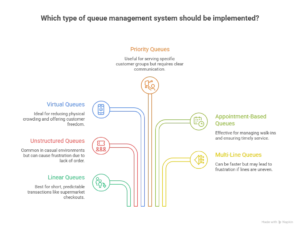
Not all queues look the same. Understanding the type of queue in your business is the first step to managing it properly.
1. Linear / Structured Queues
The classic single-file line. Everyone joins at the back and moves forward as people are served. Simple, fair, and easy to understand.
This kind of works especially in places where the duration of a transaction is short and very predictable – supermarket checkouts, fast food counters, airport security.
2. Unstructured Queues
No defined line — people cluster and wait in a loosely organised group. Common in busy casual environments like bars, market stalls, or informal service counters.
These ones are the hardest to deal with since there isn’t a definite order. People get frustrated rather quickly when they don’t even know what their position is.
3. Virtual or Mobile Queues
Customers join a queue remotely — through an app, a website, or a QR code — and wait wherever they choose. They’re notified when it’s their turn.
This type has grown significantly post-pandemic. It removes physical crowding and gives customers freedom while they wait.
4. Priority Queues
Certain customers are served before others based on defined criteria — elderly customers, people with disabilities, premium members, or urgent cases in healthcare settings.
Priority queuing needs clear communication to avoid frustration among other customers who don’t understand why someone was served out of turn.
5. Appointment-Based Queues
Customers book a specific time slot and arrive for a scheduled service. The queue is managed before anyone even walks through the door.
Common in healthcare, professional services, and government offices. Reduces walk-in crowding significantly when implemented well.
6. Multi-Line Queues
Multiple queues running simultaneously, each leading to a different service point. Customers choose which line to join.
Faster theoretically, but it leads to frustration if one line is visibly slower than another. Nowadays, these are often replaced by single-queue-multiple-server systems in modern
What Is a Queue Management System?
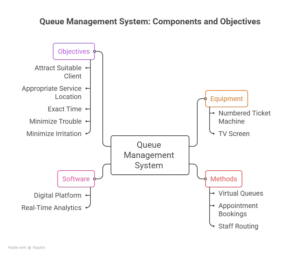
A queue management system represents a set of equipment, methods, and software that are designed to help arrange and regulate the movement of customers in a service location.
It may be just a numbered ticket machine along with a TV showing the current number or a very complex system in which digital platform is fully integrated for managing virtual queues, appointment bookings, staff routing and real-time analytics across multiple locations.
Ultimately, the objective remains constant — attract the suitable client to the appropriate service location at the exact time, while causing as little trouble and irritation as possible.
What Is Queue Management Software?
Queue management software is the digital layer that powers a modern queue management system.
It handles everything from virtual check-ins and automated notifications to staff dashboards, service analytics, and customer feedback collection — all from a single platform.
Good queue management software doesn’t just organise queues. It gives you visibility into your entire service operation — where bottlenecks happen, how long customers actually wait, which service points are overloaded, and where efficiency can be improved.
For businesses serious about customer experience, it’s moved from a nice-to-have to a genuine operational necessity.
The 4 Types of Queue Management Systems
1. Physical Queue Management
Barriers, signage, and staff directing customers into organised lines. No technology involved.
It’s the most basic form of queue management and works for simple, low-volume environments. The limitation is scalability — it requires staff time and doesn’t provide any data or flexibility.
2. Ticketing Systems
Customers take a numbered ticket on arrival and wait to be called. A display screen shows the current number being served.
Simple, reliable, and widely understood. Works well in banks, pharmacies, and government offices. The downside is customers are tied to the waiting area — they can’t leave and come back.
3. App-Based Systems
Customers join and monitor a queue through a dedicated mobile app. They receive real-time updates on their position and estimated wait time.
More flexible than ticketing systems and gives customers freedom to wait wherever they choose. Requires customers to download and use the app, which can be a barrier for some.
4. QR Code / Web-Based Virtual Queue Systems
Customers scan a QR code or visit a web link to join a queue — no app download needed. They receive updates via SMS or browser notifications.
The most frictionless virtual option currently available. No hardware to maintain, no app to install, and customers can join from anywhere. Growing fast across retail, healthcare, and hospitality.
Key Benefits of Queue Management Software
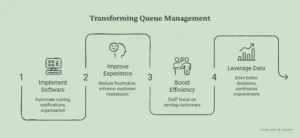
The most immediate benefit is the customer experience. Organised, transparent queuing reduces frustration and leaves a better impression — even when wait times are the same.
Staff efficiency improves significantly too. When the system handles routing, notifications, and queue organisation, staff focus on serving customers rather than managing crowds.
Data is another major benefit. Queue management software captures real-time and historical data on wait times, service durations, peak periods, and throughput. That data drives better staffing decisions, smarter scheduling, and continuous service improvement.
For multi-location businesses, centralised visibility across all sites is genuinely powerful. You can identify which locations are struggling and why — without needing to be physically present.
And for customers, the option to wait virtually rather than standing in line is increasingly an expectation, not a bonus.
Key Features to Look for in Queue Management Software
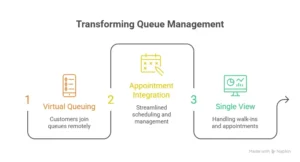
Virtual queuing lets customers join and monitor their position remotely. It’s become a baseline Features for modern queue management systems.
Real-time notifications keep customers informed via SMS, app alerts, or browser notifications. Customers who know their wait time are significantly more patient than those left guessing.
Appointment scheduling lets customers book time slots in advance and reduces walk-in crowding. Integrating appointments and walk-ins into a single queue view is where the real efficiency gains happen.
Staff dashboards give service teams visibility into current queue status, wait times, and workload distribution across service points.
Analytics and reporting turn operational data into insight. Look for software that tracks average wait times, service durations, abandonment rates, and peak period patterns.
Multi-location support matters if you operate more than one site. A good system manages queues across all locations from a single platform.
Integration capabilities determine how well the software connects with your existing tools — CRM, booking systems, payment platforms, and communication tools.
Industries That Benefit Most from Queue Management Software
Industries sees some of the strongest results. Hospitals, clinics, and pharmacies deal with high volumes, complex priority management, and emotionally heightened customers. Virtual queuing and appointment integration make a significant difference.
Retail and banking have been using queue management for years, and the shift toward virtual queuing has accelerated post-pandemic. Customers expect to be able to join a queue without physically standing in one.
Government offices and public services handle high volumes of complex queries. Appointment-based systems dramatically reduce walk-in crowding and improve the experience for both citizens and staff.
Hospitality and restaurants benefit from waitlist management tools that let diners join a virtual queue and receive a notification when their table is ready — rather than crowding a reception area.
Telecoms and utility service centres deal with a mix of walk-ins and scheduled appointments. Queue management software that handles both in a single view improves service throughput significantly.
How to Pick the Right Queue Management Software for Your Business
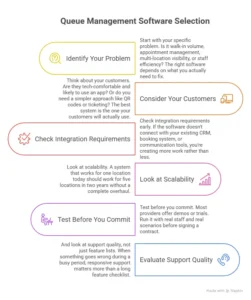
Start with your specific problem. Is it walk-in volume, appointment management, multi-location visibility, or staff efficiency? The right Queue Management software depends on what you actually need to fix.
Think about your customers. Are they tech-comfortable and likely to use an app? Or do you need a simpler approach like QR codes or ticketing? The best system is the one your customers will actually use.
Check integration requirements early. If the software doesn’t connect with your existing CRM, booking system, or communication tools, you’re creating more work rather than less.
Look at scalability. A system that works for one location today should work for five locations in two years without a complete overhaul.
Test before you commit. Most providers offer demos or trials. Run it with real staff and real scenarios before signing a contract.
And look at support quality, not just feature lists. When something goes wrong during a busy period, responsive support matters more than a long feature checklist.
Common Mistakes to Avoid When Implementing Queue Management Software
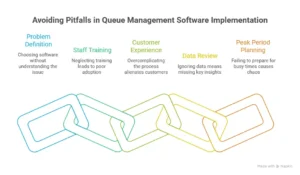
Choosing software before defining the problem is the most common mistake. A system built for appointment management won’t solve a walk-in crowding problem — and vice versa. Start with the problem, then find the solution.
Ignoring staff training leads to poor adoption. The software is only as good as the people using it. Make sure your team understands the system before it goes live.
Overcomplicating the customer experience backfires. If joining a virtual queue requires too many steps, customers won’t bother. Simple and fast is almost always better.
Skipping the data review means missing the point. Queue management software generates valuable operational data. Businesses that don’t look at it regularly lose one of the biggest benefits of having the system.
Not planning for peak periods causes problems at exactly the wrong moment. Test your system under high-volume conditions before those conditions arrive — not during them.
Frequently Asked Questions
What is queue management software?
It’s a digital platform that organises and controls how customers wait for a service. It handles virtual check-ins, notifications, staff routing, and analytics — all from a single system.
What types of businesses need queue management software?
Any business where customers wait for service can benefit. Healthcare, retail, banking, government offices, hospitality, and telecoms see the strongest results.
What is the difference between a ticketing system and virtual queuing?
A ticketing system gives customers a physical number and ties them to a waiting area. Virtual queuing lets customers join and monitor a queue remotely — via app, QR code, or web link — and wait wherever they choose.
How much does queue management software cost?
Pricing varies widely. Cloud-based solutions typically range from AED 200 to AED 1,500 per month. Enterprise systems are priced on request. Most providers use monthly or annual subscription models.
Can queue management software integrate with existing systems?
Most modern platforms integrate with CRM systems, booking tools, payment platforms, and communication tools. Check integration compatibility before committing to any provider.
How does virtual queuing improve customer experience?
It removes the need to physically stand in a line. Customers join remotely, receive real-time updates on their wait, and are notified when it’s their turn. Wait time feels shorter and the overall experience is less frustrating.
Conclusion
Long, disorganised queues cost businesses more than most realise — in lost customers, frustrated staff, and missed operational insight.
Queue management software solves all of that. It organises customer flow, improves the waiting experience, gives staff the visibility they need, and provides the data to keep improving over time.
The right system depends on your business, your customers, and the specific problems you’re trying to fix. But for any business where people wait for service, getting queue management right is worth the investment.
At EBR, we help businesses implement queue management solutions that actually work — from system selection and setup to ongoing support as your needs evolve.