Key Takeaways
- HR software saves time, reduces errors, and helps teams stay organized.
- It has clear advantages but requires upfront cost and some training.
- Tools like EBR make HR simpler for growing businesses without adding stress.
Advantages of HR Software
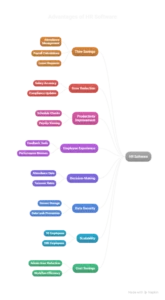
1. Saves Time by Automating Manual Tasks
HR software manages repetitive tasks like attendance, payroll calculations, and leave requests automatically. This gives HR teams more time to focus on employees instead of paperwork.
2. Reduces Human Errors & Ensures Compliance
Salary mistakes and compliance slip-ups can create unnecessary trouble. HR tools keep everything accurate and updated with local regulations, reducing the chance of costly errors.
3. Improves Productivity Across Teams
When employees can check schedules, request leave, update details, or view payslips on their own, everything moves faster. No more waiting for HR to sort basic requests.
4. Enhances Employee Experience & Engagement
Features like feedback tools, performance reviews, and recognition systems help teams feel more connected and valued, which naturally boosts morale.
5. Better Decision-Making Through Analytics
HR dashboards display current data on attendance, performance, turnover, and hiring needs. This helps to plan with confidence in an easy way.
6. Stronger Data Security & Centralized Storage
All employee information sits in one secure space instead of being scattered across folders or spreadsheets. This lowers the chances of data leaks and documents that are lost.
7. Scales Easily as Your Business Grows
HR software grows with your team. Whether you have 10 or 200 employees, the system keeps everything organized without extra effort.
8. Cost Savings Over the Long Term
Even though there’s a price, the software pays off by cutting admin hours, preventing payroll mistakes, and improving workflow efficiency.
Disadvantages of HR Software
1. Upfront and Subscription Costs
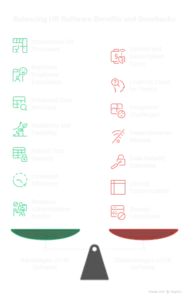
Some tools cost more than expected, especially when you add modules. For a very small team, this can feel like a big step.
2. Learning Curve for Teams
Not everyone adjusts quickly to new systems. HR teams and employees may need a little time to get used to the layout and features.
3. Integration Challenges
Some HR tools don’t connect easily with old payroll software, CRMs, or attendance devices. This can slow down setup.
4. Dependence on Internet & Technology
Cloud systems need stable internet. A weak connection can slow things down, especially during payroll days.
5. Data Security Concerns (If Poorly Managed)
Strong HR tools protect data well. But cheaper, poorly built systems can expose sensitive info if not configured properly.
6. Limited Customization in Low-Cost Tools
Budget-friendly HR software often comes with fixed templates that can’t be changed to match unique HR processes.
7. Storage Limitations (On-premise Systems)
If a company hosts its own HR software, it must handle storage, backups, and maintenance, which can get expensive.
Cloud-Based vs On-Premise HR Software — Key Differences
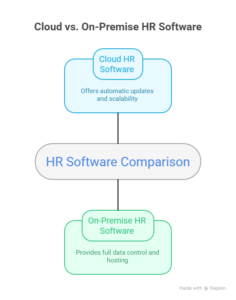
Cloud HR Software (SaaS)
Pros: Automatic updates, easy to scale, works from anywhere.
Cons: Requires internet and comes with recurring subscription fees.
On-Premise HR Software
Pros: Full control over data and hosting.
Cons: Higher setup costs and in-house maintenance responsibilities.
When HR Software Is Worth It
| Situation |
Why HR Software Helps |
| Your employee count is growing |
More people mean more data, more requests, and more admin. HR software keeps everything organized without adding pressure to your team. |
| Your HR team is buried in manual work |
If spreadsheets take over your day, automation reduces the workload and speeds up routine tasks. |
| You deal with payroll errors or compliance worries |
HR software calculates pay correctly and keeps you aligned with labor rules, reducing mistakes. |
| You manage hybrid or distributed teams |
Digital systems keep teams connected, track attendance, and make communication easier from anywhere. |
| You want to create a better employee experience |
Self-service tools, feedback features, and smooth onboarding help employees feel supported and valued. |
How to Choose the Right HR Software for Your Business

Choose tools that match your workflow instead of forcing you to change everything. Focus on ease of use, automation features, security, integration options, and support quality. A good HR system should feel helpful from day one — not complicated or confusing.
How EBR Helps Your HR Team Work Smarter

EBR brings HR tasks into one clean, easy dashboard so teams can work without stress. From payroll automation to attendance tracking and secure data storage, it supports HR teams that want clarity instead of chaos. With simple tools and a user-friendly layout, EBR helps businesses run smoothly without tons of training or complex setup.
Conclusion
HR software won’t just keep employee details in one place. The software will enhance the ways businesses operate by making them more efficient, swift, and error-free. Although it has some challenges, the advantages are mostly far beyond the disadvantages, particularly when your company is expanding. With the right tool like EBR in place, HR becomes less about running after files and more about supporting people to achieve their best work.