Key Takeaways
- Plan Before You Start – Evaluate your current queues, outline your processes, and select the ideal system for your business. Planning makes everything else easier.
- Involve People – Train your staff and guide your customers. A system only works if everyone knows how to use it.
- Monitor and Improve – Test it first, gather feedback, and keep checking how it’s working. Small modifications over time make the system more effective and stress-free for everyone.
But how do you actually set one up? This blog is your complete Queue Management System Implementation Guide. We’ll walk you through the steps and share tips on implementing a queue management system. We will highlight the benefits, challenges, and timelines so you know exactly how to implement a queue in your business.
Steps to Implement a Queue Management System
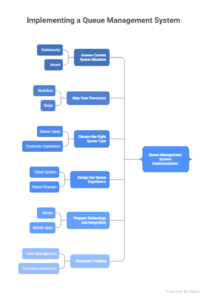
1. Assess Current Queue Situation
Start by studying how your queues currently work. Where do people get stuck the most? For example, in a hospital, bottlenecks may happen at registration, while in a bank, it could be at the cash counter. By mapping these issues, you’ll know what needs fixing.
2. Map Your Processes
Every business has a workflow. A clinic may have registration → doctor → lab → pharmacy, while a bank may have account services → loans → cash counters. Mapping these steps helps you design a system that matches your actual process instead of forcing a generic solution.
3. Choose the Right Queue Type
Not all queues are the same. When implementing a queue management system, you’ll need to decide the type:
- Single Line, Multiple Servers – One line feeding multiple counters.
- Separate Queues by Service – Different lines for different services.
- Virtual Queues – Customers wait remotely and get notified via SMS or app.
Choosing wisely ensures customers get the smoothest experience.
4. Design the Queue Experience
Think about what customers see and feel. Should they get a printed token, SMS alert, or app notification? Do you need digital displays in waiting areas? The design should reduce stress and make the process as clear as possible.
5. Prepare Technology and Integration
A good queue management system implementation often needs technology like kiosks, display screens, mobile apps, or reporting dashboards. Make sure your QMS integrates with existing systems (like hospital software or banking CRMs) so everything runs smoothly together.
6. Employee Training
Your staff play a key role. Train them to manage tickets, assist customers, and handle alerts. A well-trained team ensures the system actually works instead of confusing both staff and customers.
7. Customer Communication and Training
Don’t assume customers will instantly know what to do. Use clear signage, announcements, or even short demonstrations to guide them. Simple instructions help customers adapt quickly.
8. Pilot Test and Collect Feedback
Before launching everywhere, run a small pilot. Test the QMS in one department or during specific hours. Gather feedback from customers and staff to fix issues before full rollout.
9. Launch and Monitor Performance
Once ready, roll out the system across all areas. Use dashboards and analytics to monitor waiting times, service efficiency, and customer feedback. Regular monitoring ensures the system continues to improve.
Tips for a Customer-Friendly Implementation
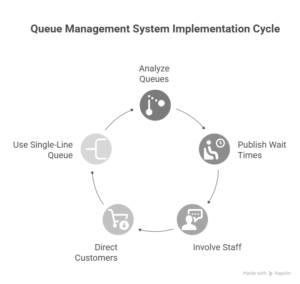
Perform Comprehensive Queue Analysis
The more you understand your current queues, the better your QMS will work. Analyze peak times, customer flow, and obstacles.
Publish Estimated Wait Times
Display wait times on screens or apps. This reduces stress because customers know exactly how long they need to wait.
Get Your Staff Involved
Employees who interact directly with customers can give valuable input. Involving them early increases system adoption.
Ensure Requests Are Directed to the Right Personnel
Make sure the QMS routes customers to the right service counter. For example, banking customers needing a loan shouldn’t end up in the cash counter queue.
Use a Single-Line Queue Configuration
When in doubt, a single-line system works best. It’s simple, fair, and prevents arguments about who came first.
Speed and Timeline of Implementation
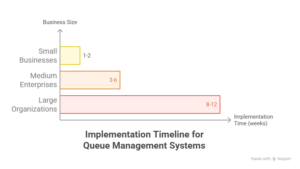
How long does queue management system implementation take? It depends on business size and complexity:
- Small businesses – 1–2 weeks with basic systems.
- Medium enterprises – 3–6 weeks with multiple counters and integration.
- Large organizations – 2–3 months, including testing and full deployment.
A good rule: start small, run a pilot, then expand gradually.
Key Benefits of Implementation
Benefits of implementing the queue management system include several advantages:
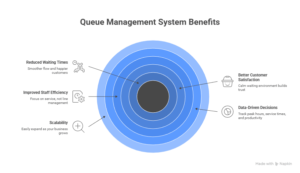
Reduced waiting times lead to smoother flow and happier customers. When people spend less time standing in line, they feel more relaxed and positive about your service. This calm experience builds trust and naturally improves overall satisfaction.
With fewer manual tasks, your staff can focus on what matters — serving customers instead of managing queues. At the same time, the system gives you useful data about peak hours, service times, and team productivity, helping you make smarter decisions.
And as your business grows, the same system scales effortlessly, adapting to new locations or higher foot traffic without missing a beat.
Challenges of QMS Implementation
Like any system, there are hurdles when implementing a queue management system:
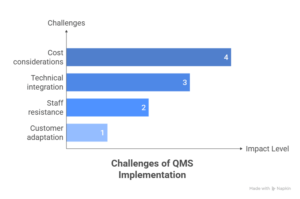
- Cost considerations – Advanced systems require investment.
- Technical integration – Connecting with existing software can be tricky.
- Staff resistance – Some employees may be slow to adapt.
- Customer adaptation – First-time users might need guidance.
The solution is to prepare early, train your team, and communicate clearly with customers.
Conclusion
Learning how to implement a queue management system is not complicated when you break down the process. Begin by evaluating your current queues, pick the right system, design a smooth customer experience, train staff, and test before launch.
This queue management system implementation guide shows that the process is more than just installing software. It is about reshaping how people experience your business. With proper planning, clear communication, and regular monitoring, you’ll transform long waiting lines into a smooth, stress-free experience.
If your business is ready to move past frustrating queues, now’s the time to get started. A solution like EBR Software can help you manage customer flow smoothly, keep staff focused, and create a better experience for everyone.